What's new at GoDutch
Stay up to date with the latest GoDutch product news. We're building quickly so you can improve your business faster.
30 Jun 2026
June update

This update is all about less manual work and more oversight: your expenses, your contacts and your payments, arranged faster and in one place. Here is what is new.
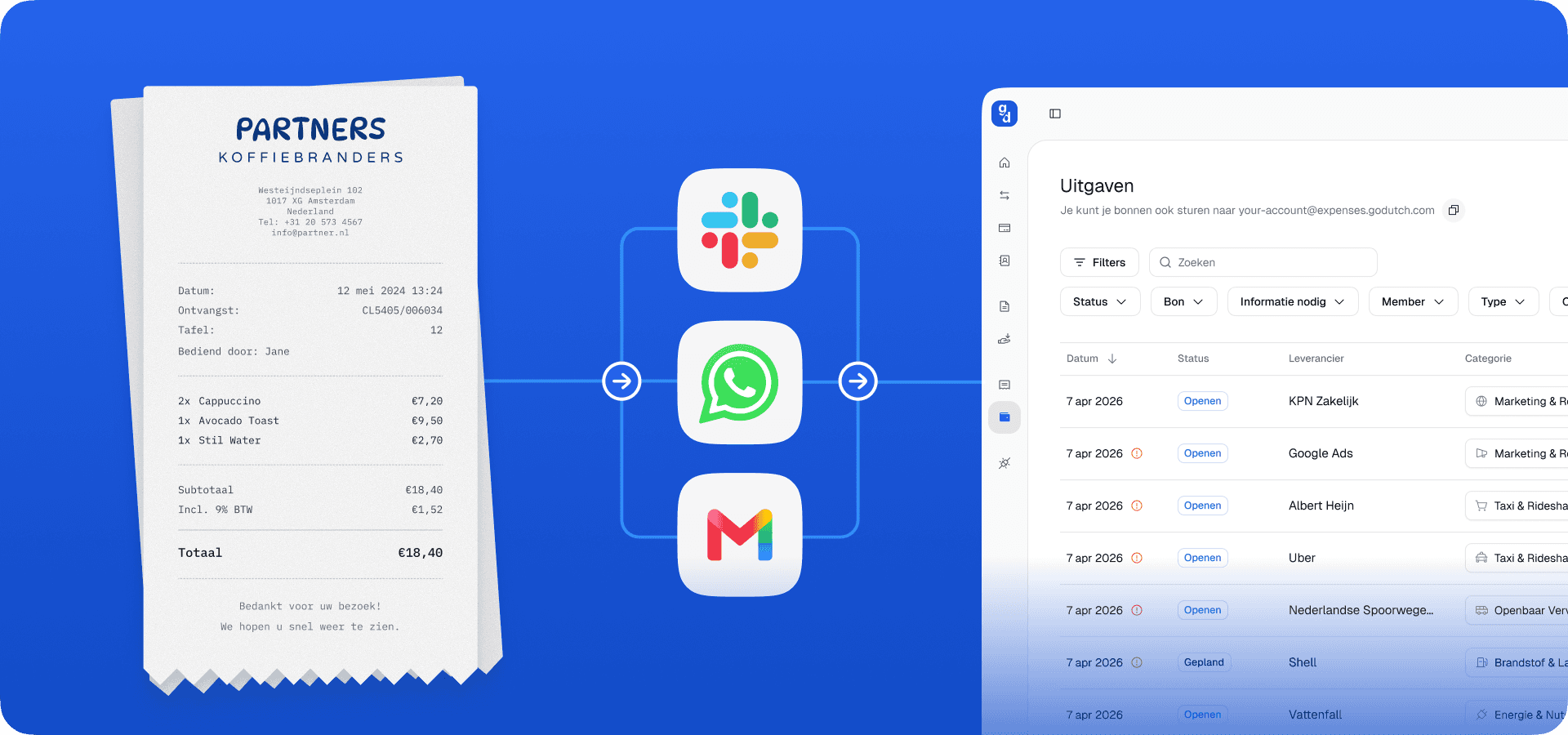
AI expense agent on WhatsApp
The AI expense agent is a WhatsApp assistant that records your expenses the moment you pay. If you pay with your GoDutch card, you will receive a WhatsApp message. The agent reads the details, categorises everything and automatically links every receipt to the correct transaction. You get a real-time overview of where your money is going. No manual input, no extra app to download, no hassle.
You connect WhatsApp on your PC via Settings → Channels. Available for Slack next week as well.
Contacts: the address book as it should be
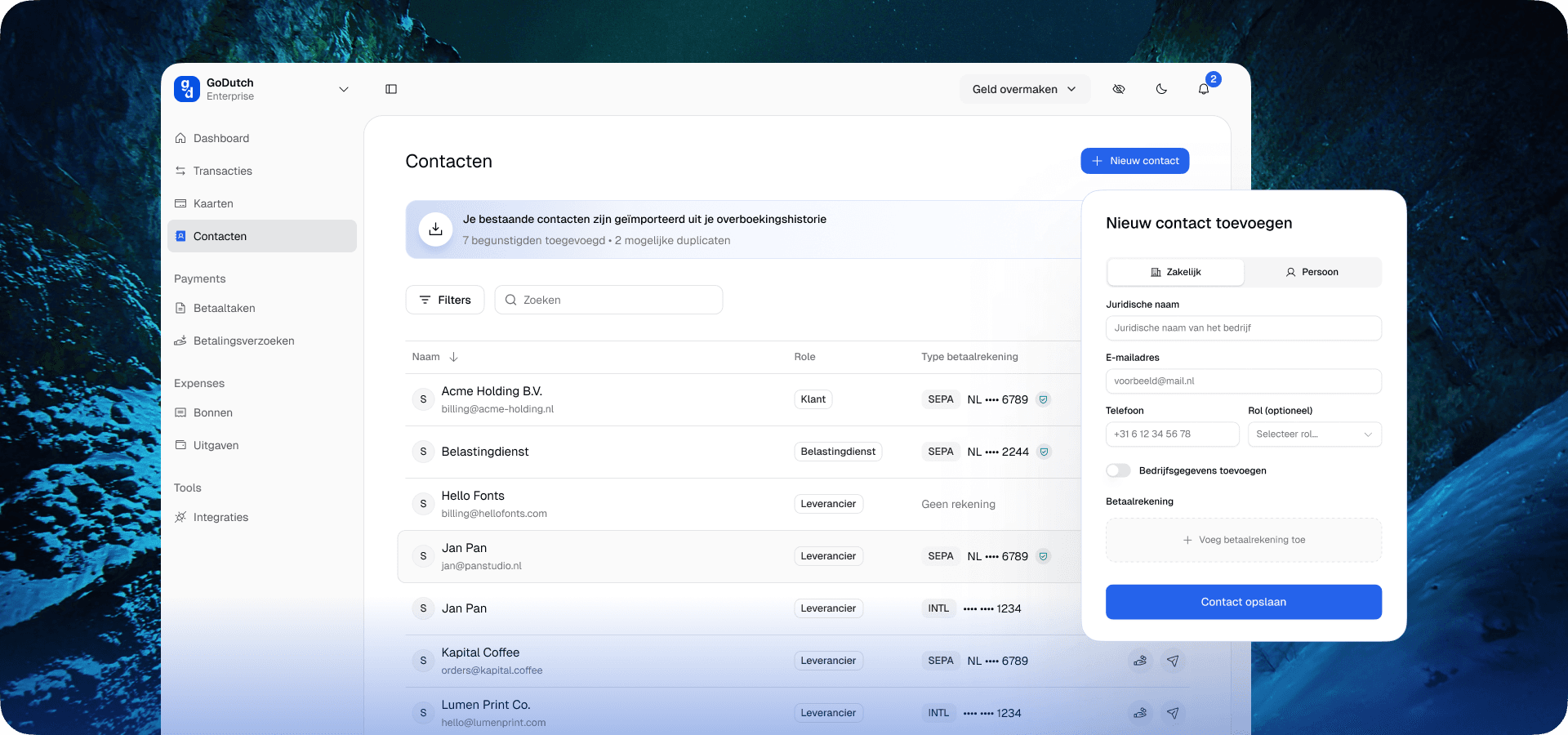
Save everyone with a name and email address, assign them a role — Client, Supplier, Notary or Accountant — and find them in the new Contacts tab in the sidebar. Search, filter and pay directly from a contact's profile. Your existing beneficiaries will be imported automatically, so everyone you have paid before is already there.
International transfers, now also on mobile
Sending money in a different currency previously meant opening a browser. No longer. International transfers are now available directly in the app, built on the same contacts model. Open the app, choose a contact, send.
Higher card limits up to €100,000
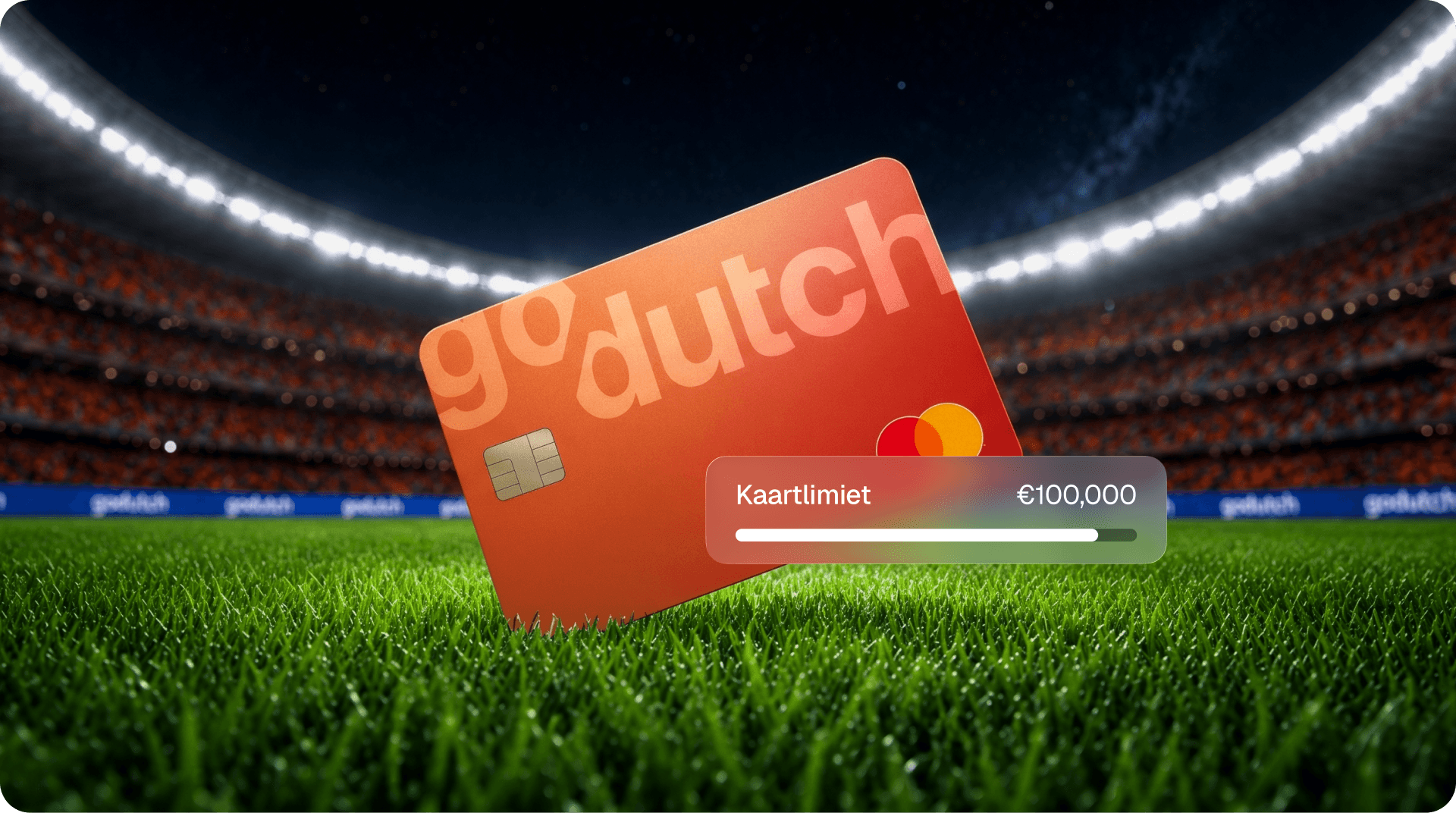
Standard GoDutch cards have a limit of up to €10,000. If you have a Pro or Max subscription and need more room, you can now set limits of up to €100,000. You will still receive cashback as usual: 0.5% for Pro, 1% for Max. You can find this option when creating or editing a card.
June update
This update is all about less manual work and more oversight: your expenses, your contacts and your payments, arranged faster and in one place. Here is what is new.
AI expense agent on WhatsApp
The AI expense agent is a WhatsApp assistant that records your expenses the moment you pay. If you pay with your GoDutch card, you will receive a WhatsApp message. The agent reads the details, categorises everything and automatically links every receipt to the correct transaction. You get a real-time overview of where your money is going. No manual input, no extra app to download, no hassle.
You connect WhatsApp on your PC via Settings → Channels. Available for Slack next week as well.
Contacts: the address book as it should be
Save everyone with a name and email address, assign them a role — Client, Supplier, Notary or Accountant — and find them in the new Contacts tab in the sidebar. Search, filter and pay directly from a contact's profile. Your existing beneficiaries will be imported automatically, so everyone you have paid before is already there.
International transfers, now also on mobile
Sending money in a different currency previously meant opening a browser. No longer. International transfers are now available directly in the app, built on the same contacts model. Open the app, choose a contact, send.
Higher card limits up to €100,000
Standard GoDutch cards have a limit of up to €10,000. If you have a Pro or Max subscription and need more room, you can now set limits of up to €100,000. You will still receive cashback as usual: 0.5% for Pro, 1% for Max. You can find this option when creating or editing a card.
30 Jun 2026
June update
This update is all about less manual work and more oversight: your expenses, your contacts and your payments, arranged faster and in one place. Here is what is new.
AI expense agent on WhatsApp
The AI expense agent is a WhatsApp assistant that records your expenses the moment you pay. If you pay with your GoDutch card, you will receive a WhatsApp message. The agent reads the details, categorises everything and automatically links every receipt to the correct transaction. You get a real-time overview of where your money is going. No manual input, no extra app to download, no hassle.
You connect WhatsApp on your PC via Settings → Channels. Available for Slack next week as well.
Contacts: the address book as it should be
Save everyone with a name and email address, assign them a role — Client, Supplier, Notary or Accountant — and find them in the new Contacts tab in the sidebar. Search, filter and pay directly from a contact's profile. Your existing beneficiaries will be imported automatically, so everyone you have paid before is already there.
International transfers, now also on mobile
Sending money in a different currency previously meant opening a browser. No longer. International transfers are now available directly in the app, built on the same contacts model. Open the app, choose a contact, send.
Higher card limits up to €100,000
Standard GoDutch cards have a limit of up to €10,000. If you have a Pro or Max subscription and need more room, you can now set limits of up to €100,000. You will still receive cashback as usual: 0.5% for Pro, 1% for Max. You can find this option when creating or editing a card.
30 Apr 2026
April update

This update was aimed at two things: helping new businesses through the sign-up process faster, and reducing manual work once you get started. Here is what has been released and what is currently being rolled out.
Remind a cardholder to submit a receipt
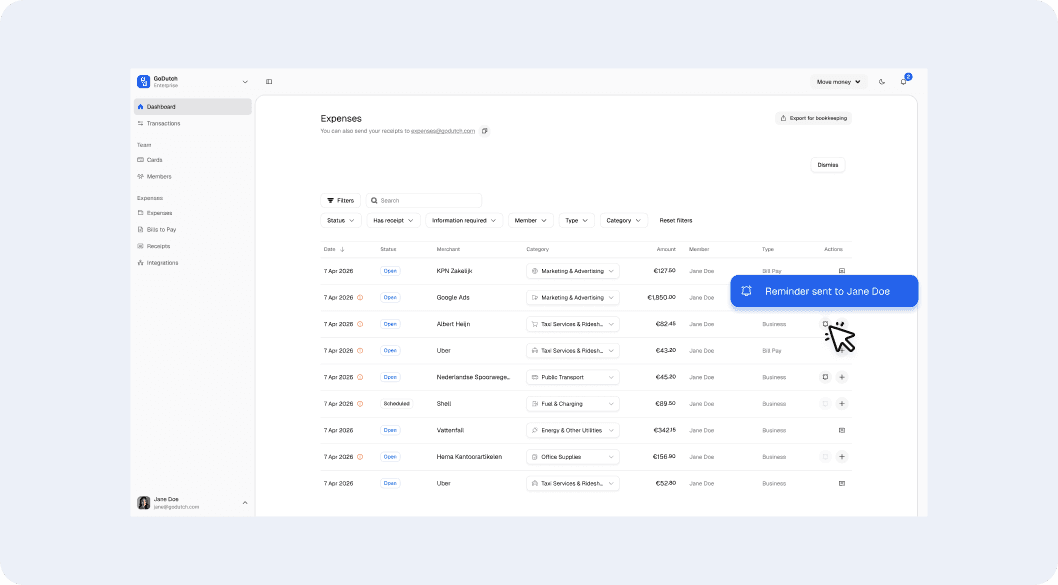
With GoDutch, you can issue corporate payment cards to employees and track their expenses. Has a team member not yet submitted a receipt for a card payment? Send them a reminder directly from the app. One tap, and the cardholder automatically receives an email to submit the receipt.
Cleaner accounting exports
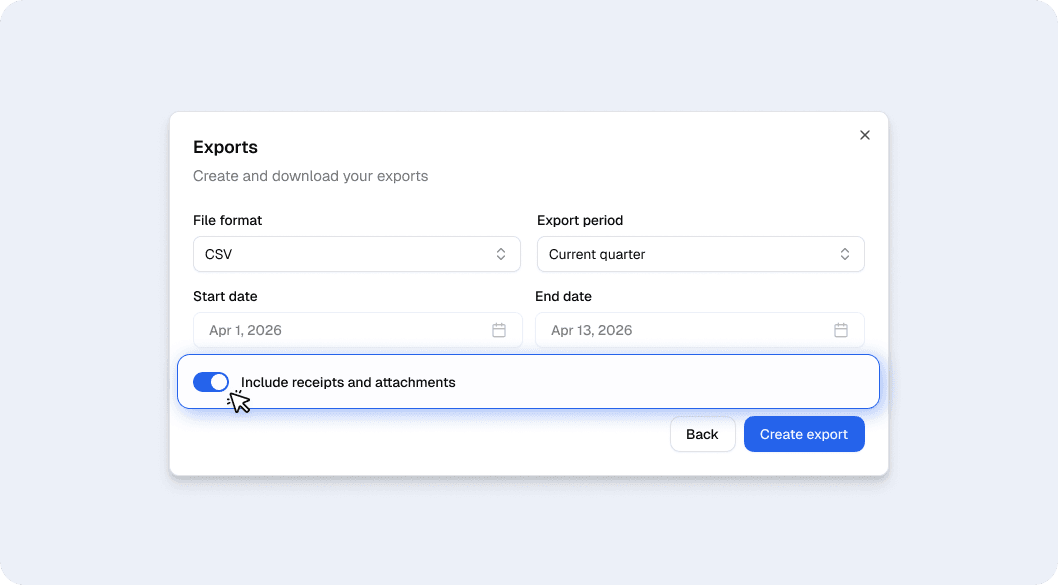
With GoDutch, you export your transactions for your accountant or accounting software. Exports now bundle each transaction together with its corresponding receipt in one clear file. This way, your accountant has everything in one place, no more downloading transactions and receipts separately, or manually linking them together.
Pay multiple invoices at once
Process your outstanding invoices in one go from now on. Select the payments you want to make, review them in the summary screen, and confirm the entire batch with a single authorisation. No more separate approval per invoice.
Handy for those who pay multiple suppliers every week: you choose which invoices you include, check the amounts and recipients, and pay everything at once. After authorisation, you will immediately see the status of each payment. You can find it in Bill Pay under your outstanding payments.
Improvements
Automatic emails GoDutch now automatically sends you an email at key moments: when creating your account, ordering a card, or if you get stuck during sign-up.
Guided first deposit After opening your account, GoDutch guides you through your first deposit. Your balance is available sooner, so you can pay straight away.
Clearer subscription limits You can see exactly what your plan allows. If you reach a limit, you’ll be directed to a suitable plan, with no surprises.
Empty pages explained Pages that were previously blank now show what the feature does and the first step to take. No more blank screens.
Faster ordering for your first card Default settings are already filled in, and fewer steps are needed. Your card is on its way more quickly.
Speed The dashboard loads faster. Switching between accounts is quicker.
April update
This update was aimed at two things: helping new businesses through the sign-up process faster, and reducing manual work once you get started. Here is what has been released and what is currently being rolled out.
Remind a cardholder to submit a receipt
With GoDutch, you can issue corporate payment cards to employees and track their expenses. Has a team member not yet submitted a receipt for a card payment? Send them a reminder directly from the app. One tap, and the cardholder automatically receives an email to submit the receipt.
Cleaner accounting exports
With GoDutch, you export your transactions for your accountant or accounting software. Exports now bundle each transaction together with its corresponding receipt in one clear file. This way, your accountant has everything in one place, no more downloading transactions and receipts separately, or manually linking them together.
Pay multiple invoices at once
Process your outstanding invoices in one go from now on. Select the payments you want to make, review them in the summary screen, and confirm the entire batch with a single authorisation. No more separate approval per invoice.
Handy for those who pay multiple suppliers every week: you choose which invoices you include, check the amounts and recipients, and pay everything at once. After authorisation, you will immediately see the status of each payment. You can find it in Bill Pay under your outstanding payments.
Improvements
Automatic emails GoDutch now automatically sends you an email at key moments: when creating your account, ordering a card, or if you get stuck during sign-up.
Guided first deposit After opening your account, GoDutch guides you through your first deposit. Your balance is available sooner, so you can pay straight away.
Clearer subscription limits You can see exactly what your plan allows. If you reach a limit, you’ll be directed to a suitable plan, with no surprises.
Empty pages explained Pages that were previously blank now show what the feature does and the first step to take. No more blank screens.
Faster ordering for your first card Default settings are already filled in, and fewer steps are needed. Your card is on its way more quickly.
Speed The dashboard loads faster. Switching between accounts is quicker.
30 Apr 2026
April update
This update was aimed at two things: helping new businesses through the sign-up process faster, and reducing manual work once you get started. Here is what has been released and what is currently being rolled out.
Remind a cardholder to submit a receipt
With GoDutch, you can issue corporate payment cards to employees and track their expenses. Has a team member not yet submitted a receipt for a card payment? Send them a reminder directly from the app. One tap, and the cardholder automatically receives an email to submit the receipt.
Cleaner accounting exports
With GoDutch, you export your transactions for your accountant or accounting software. Exports now bundle each transaction together with its corresponding receipt in one clear file. This way, your accountant has everything in one place, no more downloading transactions and receipts separately, or manually linking them together.
Pay multiple invoices at once
Process your outstanding invoices in one go from now on. Select the payments you want to make, review them in the summary screen, and confirm the entire batch with a single authorisation. No more separate approval per invoice.
Handy for those who pay multiple suppliers every week: you choose which invoices you include, check the amounts and recipients, and pay everything at once. After authorisation, you will immediately see the status of each payment. You can find it in Bill Pay under your outstanding payments.
Improvements
Automatic emails GoDutch now automatically sends you an email at key moments: when creating your account, ordering a card, or if you get stuck during sign-up.
Guided first deposit After opening your account, GoDutch guides you through your first deposit. Your balance is available sooner, so you can pay straight away.
Clearer subscription limits You can see exactly what your plan allows. If you reach a limit, you’ll be directed to a suitable plan, with no surprises.
Empty pages explained Pages that were previously blank now show what the feature does and the first step to take. No more blank screens.
Faster ordering for your first card Default settings are already filled in, and fewer steps are needed. Your card is on its way more quickly.
Speed The dashboard loads faster. Switching between accounts is quicker.
23 Mar 2026
A faster, simpler onboarding
Opening a business account with GoDutch is now twice as fast. The application process has been reduced from 12 to 6 steps, works for every type of business — from sole trader to private limited company — and you can always see where you are and what’s coming next. You upload and sign UBO declarations fully online, without a printer or scanner.
Find your business immediately via the search function, no manual entry.
Stopped? Your progress is automatically saved.
Multiple businesses? Open accounts for all of them in a few steps.
From 12 to 6 steps — the same account, half the work.
Available for all new applications and for existing customers opening a second or subsequent account.
Improvements
Transaction fees now have a shortcut via the transaction screen
It is now clearer when a SEPA transaction cannot be executed immediately. This is now displayed in the transaction status.
Bug fixes
Fixed broken privacy link on the team members page.
Corrected badge colours in integration cards in dark mode.
Resolved issue where editing the spending limit during the creation of a card did not work.
Fixed delay where the status of payment orders was not updated immediately.
Resolved issue where OCR data was not saved with expense claims.
Fixed issue where the transaction list stopped working.
Corrected Google Play link so that it opens the wallet correctly.
Resolved mobile app issue where users were logged out when cancelling a standing order.
Fixed issue where employees could see transactions of other users when linking expense claims.
Resolved iOS crash in transaction details due to invalid values.
Fixed issue where payments from expense claims did not arrive.
Resolved claims created without merchant or category information.
Fixed login issue on the web where users were redirected after 2FA.
Resolved issue where billed invoices did not appear as payment orders.
Restored invoice processing via email for affected accounts.
Fixed visibility issue for invoices sent to the accounts payable email address online.
Resolved loading issues on the transaction page for affected customers.
Restored mobile flow for requesting a physical card.
Fixed issue where users were logged out immediately after logging in.
Resolved issue where users could not change their display name in the web app.
Fixed transaction loading errors due to missing card details.
A faster, simpler onboarding
Opening a business account with GoDutch is now twice as fast. The application process has been reduced from 12 to 6 steps, works for every type of business — from sole trader to private limited company — and you can always see where you are and what’s coming next. You upload and sign UBO declarations fully online, without a printer or scanner.
Find your business immediately via the search function, no manual entry.
Stopped? Your progress is automatically saved.
Multiple businesses? Open accounts for all of them in a few steps.
From 12 to 6 steps — the same account, half the work.
Available for all new applications and for existing customers opening a second or subsequent account.
Improvements
Transaction fees now have a shortcut via the transaction screen
It is now clearer when a SEPA transaction cannot be executed immediately. This is now displayed in the transaction status.
Bug fixes
Fixed broken privacy link on the team members page.
Corrected badge colours in integration cards in dark mode.
Resolved issue where editing the spending limit during the creation of a card did not work.
Fixed delay where the status of payment orders was not updated immediately.
Resolved issue where OCR data was not saved with expense claims.
Fixed issue where the transaction list stopped working.
Corrected Google Play link so that it opens the wallet correctly.
Resolved mobile app issue where users were logged out when cancelling a standing order.
Fixed issue where employees could see transactions of other users when linking expense claims.
Resolved iOS crash in transaction details due to invalid values.
Fixed issue where payments from expense claims did not arrive.
Resolved claims created without merchant or category information.
Fixed login issue on the web where users were redirected after 2FA.
Resolved issue where billed invoices did not appear as payment orders.
Restored invoice processing via email for affected accounts.
Fixed visibility issue for invoices sent to the accounts payable email address online.
Resolved loading issues on the transaction page for affected customers.
Restored mobile flow for requesting a physical card.
Fixed issue where users were logged out immediately after logging in.
Resolved issue where users could not change their display name in the web app.
Fixed transaction loading errors due to missing card details.
23 Mar 2026
A faster, simpler onboarding
Opening a business account with GoDutch is now twice as fast. The application process has been reduced from 12 to 6 steps, works for every type of business — from sole trader to private limited company — and you can always see where you are and what’s coming next. You upload and sign UBO declarations fully online, without a printer or scanner.
Find your business immediately via the search function, no manual entry.
Stopped? Your progress is automatically saved.
Multiple businesses? Open accounts for all of them in a few steps.
From 12 to 6 steps — the same account, half the work.
Available for all new applications and for existing customers opening a second or subsequent account.
Improvements
Transaction fees now have a shortcut via the transaction screen
It is now clearer when a SEPA transaction cannot be executed immediately. This is now displayed in the transaction status.
Bug fixes
Fixed broken privacy link on the team members page.
Corrected badge colours in integration cards in dark mode.
Resolved issue where editing the spending limit during the creation of a card did not work.
Fixed delay where the status of payment orders was not updated immediately.
Resolved issue where OCR data was not saved with expense claims.
Fixed issue where the transaction list stopped working.
Corrected Google Play link so that it opens the wallet correctly.
Resolved mobile app issue where users were logged out when cancelling a standing order.
Fixed issue where employees could see transactions of other users when linking expense claims.
Resolved iOS crash in transaction details due to invalid values.
Fixed issue where payments from expense claims did not arrive.
Resolved claims created without merchant or category information.
Fixed login issue on the web where users were redirected after 2FA.
Resolved issue where billed invoices did not appear as payment orders.
Restored invoice processing via email for affected accounts.
Fixed visibility issue for invoices sent to the accounts payable email address online.
Resolved loading issues on the transaction page for affected customers.
Restored mobile flow for requesting a physical card.
Fixed issue where users were logged out immediately after logging in.
Resolved issue where users could not change their display name in the web app.
Fixed transaction loading errors due to missing card details.
26 Feb 2026
Export bank statements as CAMT.053 and SEPA XML

You can now export your account data as a CAMT.053 file: the standard format that banks and accounting packages in Europe use for statements. You upload the file into your accounting software, and the reconciliation runs automatically. No manual entry, no errors from retyping.
Export bank statements as CAMT.053 and SEPA XML
You can now export your account data as a CAMT.053 file: the standard format that banks and accounting packages in Europe use for statements. You upload the file into your accounting software, and the reconciliation runs automatically. No manual entry, no errors from retyping.
26 Feb 2026
Export bank statements as CAMT.053 and SEPA XML
You can now export your account data as a CAMT.053 file: the standard format that banks and accounting packages in Europe use for statements. You upload the file into your accounting software, and the reconciliation runs automatically. No manual entry, no errors from retyping.
1 Sept 2025
Pay invoices with payment tasks
Payment tasks
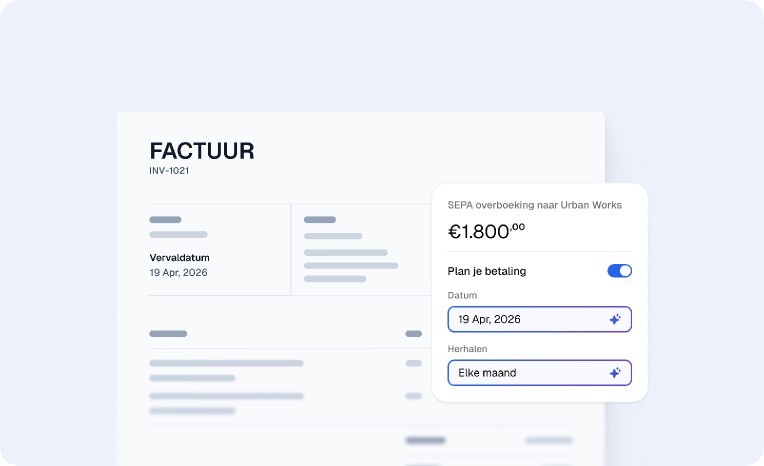
Until now, paying a business invoice meant logging into your bank, looking up supplier details and entering everything manually. One wrong digit and the payment fails, or worse, ends up in the wrong place.
Bill Pay puts an end to that. Upload an invoice and GoDutch reads it: supplier name, amount, IBAN. The payment is ready for you. You check it, you confirm it, done.
Your own invoice inbox, included.
Every GoDutch account gets its own email address. Send your invoices there, or give it to your suppliers so they can submit them directly. Invoices come in, we read them, the payment is ready.
Getting started
Log in to GoDutch and open Bill Pay in the menu bar
Upload the invoice you want to pay
GoDutch reads the invoice and prepares the payment automatically
Review and pay with one click
No manual entry. No hassle. Invoices paid.
Pay invoices with payment tasks
Payment tasks
Until now, paying a business invoice meant logging into your bank, looking up supplier details and entering everything manually. One wrong digit and the payment fails, or worse, ends up in the wrong place.
Bill Pay puts an end to that. Upload an invoice and GoDutch reads it: supplier name, amount, IBAN. The payment is ready for you. You check it, you confirm it, done.
Your own invoice inbox, included.
Every GoDutch account gets its own email address. Send your invoices there, or give it to your suppliers so they can submit them directly. Invoices come in, we read them, the payment is ready.
Getting started
Log in to GoDutch and open Bill Pay in the menu bar
Upload the invoice you want to pay
GoDutch reads the invoice and prepares the payment automatically
Review and pay with one click
No manual entry. No hassle. Invoices paid.
1 Sept 2025
Pay invoices with payment tasks
Payment tasks
Until now, paying a business invoice meant logging into your bank, looking up supplier details and entering everything manually. One wrong digit and the payment fails, or worse, ends up in the wrong place.
Bill Pay puts an end to that. Upload an invoice and GoDutch reads it: supplier name, amount, IBAN. The payment is ready for you. You check it, you confirm it, done.
Your own invoice inbox, included.
Every GoDutch account gets its own email address. Send your invoices there, or give it to your suppliers so they can submit them directly. Invoices come in, we read them, the payment is ready.
Getting started
Log in to GoDutch and open Bill Pay in the menu bar
Upload the invoice you want to pay
GoDutch reads the invoice and prepares the payment automatically
Review and pay with one click
No manual entry. No hassle. Invoices paid.
1 Aug 2025
Manage your expenses with GoDutch
With your GoDutch card, you can now keep track of your whole team's expenses in one place. Every payment — yours or a team member's — comes in automatically and is assigned a category straight away. Is something not right? One click to change it.
Every outgoing transaction is automatically categorised. Adjust the category where needed.
Upload receipts directly from the push notification, immediately after you've paid.
Receipts are automatically linked to the corresponding transaction (available in beta).
Send receipts and invoices to your personal receipt inbox in GoDutch, or share the email address with your accountant.
No stacks of receipts. No surprises at the end of the month.
Manage your expenses with GoDutch
With your GoDutch card, you can now keep track of your whole team's expenses in one place. Every payment — yours or a team member's — comes in automatically and is assigned a category straight away. Is something not right? One click to change it.
Every outgoing transaction is automatically categorised. Adjust the category where needed.
Upload receipts directly from the push notification, immediately after you've paid.
Receipts are automatically linked to the corresponding transaction (available in beta).
Send receipts and invoices to your personal receipt inbox in GoDutch, or share the email address with your accountant.
No stacks of receipts. No surprises at the end of the month.
1 Aug 2025
Manage your expenses with GoDutch
With your GoDutch card, you can now keep track of your whole team's expenses in one place. Every payment — yours or a team member's — comes in automatically and is assigned a category straight away. Is something not right? One click to change it.
Every outgoing transaction is automatically categorised. Adjust the category where needed.
Upload receipts directly from the push notification, immediately after you've paid.
Receipts are automatically linked to the corresponding transaction (available in beta).
Send receipts and invoices to your personal receipt inbox in GoDutch, or share the email address with your accountant.
No stacks of receipts. No surprises at the end of the month.
